
An igloo on a snowy hill, warm light glowing in its doorway
The story of an AI agent

ÆTY.

Somewhere far away, deep inside a quiet igloo, lives someone who always works for you.

↓ Scroll and step inside

Knock knock. Someone's waiting.

Chapter I

Meet ÆTY.

Quiet, stylish and remarkably clever. ÆTY is a penguin that lives on your Windows desktop: it listens, answers in a blink and gets things done, in English or Hungarian. It only asks first where Windows itself would. Pick a different penguin any day.


The ÆTY penguin
ÆTYThe original: friendly, relaxed, helpful
The Engineer penguin
EngineerPrecise, logical, thinks in numbers and steps
The Hipster penguin
HipsterLaid-back, trendy, ironic; coffee, vinyl, indie
The CEO penguin
CEODecisive leader: bottom line first, decision, next step
The Lazy penguin
LazyEasygoing and chill; always takes the comfiest route
The Professor penguin
ProfessorLearned, patient teacher who loves fun facts
The Pilot penguin
PilotCalm, confident captain with checklists
The Rocker penguin
RockerEnergetic, rebellious, rock and roll
The Hazelnut penguin
HazelnutBrown feathers, natural
The Midnight penguin
MidnightNavy feathers, natural
The Graphite penguin
GraphiteGrey, natural
The Cheerful penguin
CheerfulSmiling, natural

These are the 12 penguins that come with the app. Choose one in Settings → Appearance. The seven with a job (Engineer to Rocker) bring their own personality; the other five stay natural.

12penguins to choose from
10built-in apps
2languages: English and Hungarian
0admin rights needed to install

Chapter II

What ÆTY does while you don't.

01

It listens

Say “Hey ÆTY”. It waits until you've finished talking, understands English and Hungarian, and answers out loud in the Fenrir voice.

02

It chats

An iMessage-style window where replies stream in live and every conversation names itself by its topic. Flip to Fun for a cheekier tone.

03

It gets things done

Opens apps, arranges windows, sets reminders, changes the volume, finds files. Ten little apps are built in, from music and weather to a translator.

04

It stays out of the way

Ghost mode hides the window while ÆTY keeps listening. When you need it, it's one shortcut away.

Ten apps, built in

CalendarMusicWeatherNotesTimersTo-doCalculatorTranslatorClipboardSystem

Chapter III

See it in action.

The film15 seconds · with sound
The tourEverything ÆTY does, in one minute

Chapter IV

ÆTY Code. Build with AI, in the same app.

Press Ctrl Alt K and start a project. Every project gets its own folder in ~/AETY_Code.

  1. Describe it in plain words.ÆTY writes the files into your project and opens them.
  2. Edit like in VS Code.File tree, tabs, syntax colours; Ctrl S saves.
  3. See it live.The built-in preview reloads on every save, in mobile width too.
  4. Run, and fix in one click.▶ Run sends code to the terminal. If it fails, “Fix it ✨” repairs it.
The tutorialA one-minute guide

Chapter V

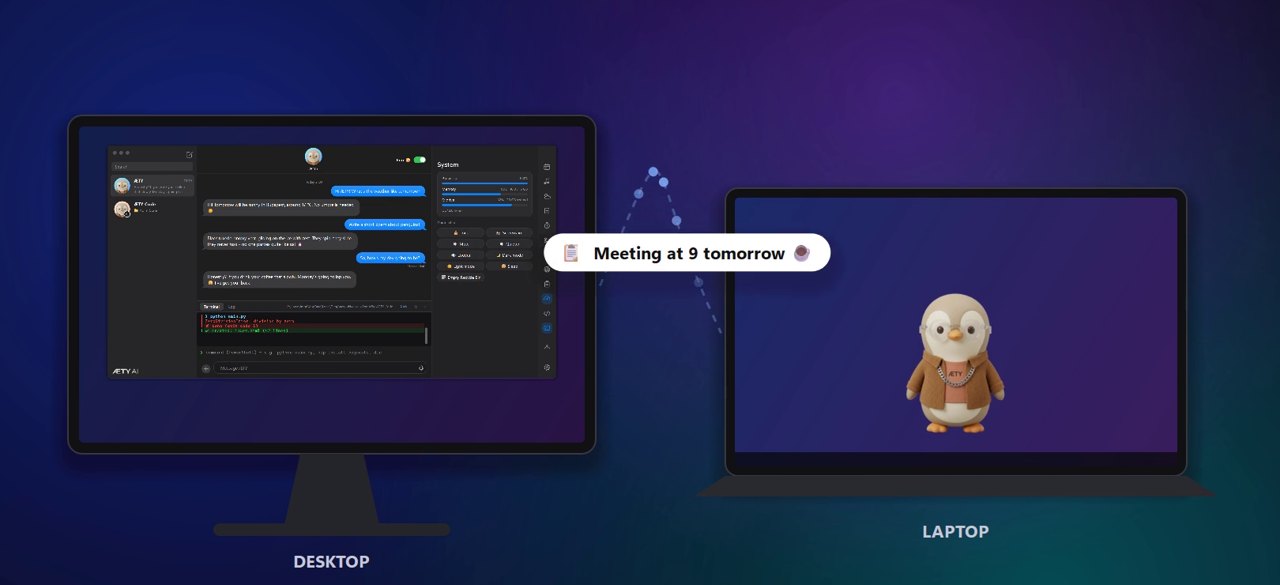
Two PCs. One ÆTY.

Pair your desktop and laptop with one token in Settings → Devices. Only your own PCs can talk to each other.

A desktop and a laptop running ÆTY, linked over Wi-Fi, with text copied on one and pasted on the other

They find each other

Every PC running ÆTY shows up on your Wi-Fi automatically.

Shared clipboard

Copy on one PC, paste on the other.

Send files

A file sent to your laptop lands in its inbox.

Wake-on-LAN

Turn on your other PC straight from this one.

Your phone too

Pair your own Discord bot for reminders on the go.

Let ÆTY in.

One installer for Windows 10 and 11. No admin rights, and nothing personal inside: every PC starts clean.

Download AETY-Setup.exe

AETY-Setup.exe · 280 MB · version 2026.10.25 · Windows 10 & 11, 64-bit

1. Run AETY-Setup.exeIf Windows SmartScreen appears, choose More info, then Run anyway.
2. Click InstallÆTY goes into your own user folder, with a Start menu and desktop shortcut.
3. Add free AI keysÆTY opens the key page on first start. One Groq or Gemini key is enough to chat. Add an OpenRouter key too for the models in ÆTY Code.